Issue setting up talawa-api Repository

I was trying to setup talawa-api and talawa-admin repository and I have also imported sample data. I am able to login to application, join organization but some feature like chat shows:: "API server unavailable. Check your connection or try again later"

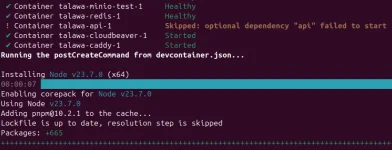
It seems like the problem lies in the talawa-api setup because when i ran the command: devcontainer up --workspace-folder .

The logs showed some warning:
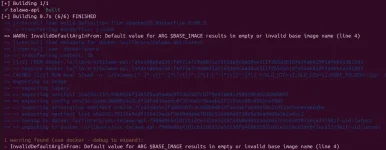
Screenshot from 2025-12-24 05-18-51.webp


Screenshot from 2025-12-24 05-19-47.webp


Also when I ran the command: docker logs talawa-api-1

it displayed :
Container started
error: Requested version 23.7.0 is not currently installed

after this when I ran the command: node -v

It displayed :

v23.7.0

I have tried reinstalling the talawa-api repository multiple times, but the issue persists.Any guidance on how to fix this would be greatly appreciated!
 
Hi!
I've seen similar issues with the Docker setup.

Make sure you have your .env file set up correctly in talawa-api (that usually fixes the ARG warning).
Try running docker compose build --no-cache to force a clean install of the dependencies.

The API server unavailable should go away once the container starts successfully.
 
I am still facing this issue despite trying a clean build with --no-cache

The command :
docker logs talawa-api-1

still has this output:
Container started
error: Requested version 23.7.0 is not currently installed

I am on develop branch and have configured the .env file in the root directory

Any suggestions on how to fix this ?
 
I solved this issue after 2 hours headache, First thing first open the dev remote container and build the containers and run it well as gone. Then the problem will you see that in logs of talawa api is node version 23.7.0 is not currently fine here. You can follow this thing in youtube video where palisdoes guide very well in mute background. Here is the video : talawa_api_youtube_video

Now open a new terminal and then run the first command nvm use 23.7.0 if not install first install it.
Node version: nvm use 23.7.0
Setup DB: pnpm run push_drizzle_schema
Seed Data: pnpm run add-sample_data
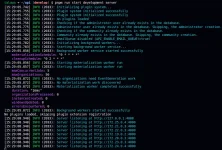
Start API: pnpm run start_development_server

1766763363079.webp

Now in next step you face that your frontend cannot fetch data from server because of URL problem:
Simple change it and restart your container or maybe again build and run the container. It's depend upon your scenario.
REACT_APP_TALAWA_URL=http://localhost:4000/graphiql


Hope it will work for you as well.
 
I solved this issue after 2 hours headache, First thing first open the dev remote container and build the containers and run it well as gone. Then the problem will you see that in logs of talawa api is node version 23.7.0 is not currently fine here. You can follow this thing in youtube video where palisdoes guide very well in mute background. Here is the video : talawa_api_youtube_video

Now open a new terminal and then run the first command nvm use 23.7.0 if not install first install it.
Node version: nvm use 23.7.0
Setup DB: pnpm run push_drizzle_schema
Seed Data: pnpm run add-sample_data
Start API: pnpm run start_development_server

View attachment 46

Now in next step you face that your frontend cannot fetch data from server because of URL problem:
Simple change it and restart your container or maybe again build and run the container. It's depend upon your scenario.
REACT_APP_TALAWA_URL=http://localhost:4000/graphiql


Hope it will work for you as well.
Thanks for the detailed follow-up and for sharing the solution 👍
Appreciate you posting the working solution
 
Back
Top